Perry Weather
- 3.1
- Rating
- 10.00K
- Installs
- Free
- Price

 Analysis by App-foxy
Weather apps are easy to ignore until you need a decision rather than a forecast. The recurring problem is not always knowing whether the sky will change; it is noticing the change early enough to move people, pause an outdoor activity, protect equipment, or avoid standing in the wrong place when lightning arrives. I found Perry Weather most useful in that gap between casually checking the weather and actively watching conditions that can affect a plan.
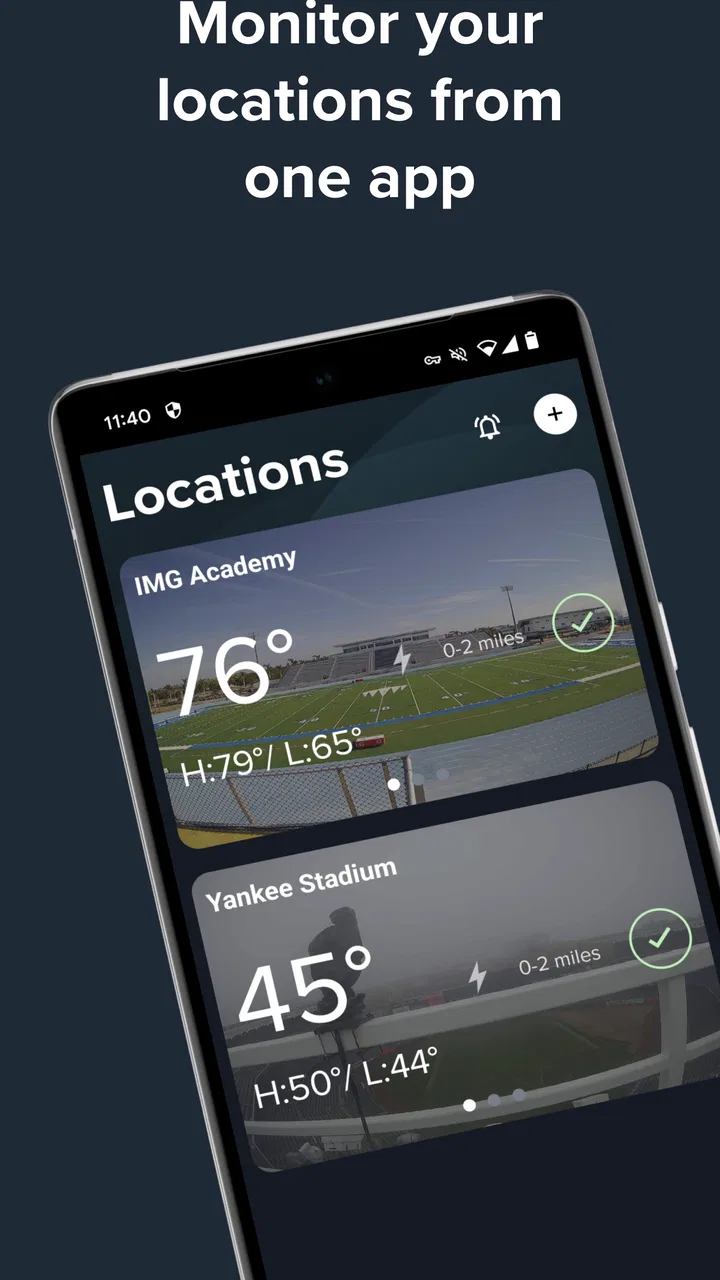
This is a free weather app from Perry Weather, Inc., focused on real-time lightning strikes, precipitation, weather information, and alerts. That focus gives it a different purpose from the usual app that mainly answers, “What will the weather be this afternoon?” I would describe it as a practical monitoring tool for people who need timely warnings, especially when outdoor plans involve several people or a schedule that is difficult to change at the last minute.
The app is rated for Everyone, and its Android listing shows more than ten thousand installs. Its average rating is 3.1 from a little over forty ratings, with a little over twenty written reviews. Those numbers suggest a modest user base and a mixed experience rather than a universally polished one. I would not choose it simply because of its store score, but I would consider it when lightning and precipitation matter more than a broad collection of weather extras.
You May Also Like

 Pandora - Music & Podcasts
Pandora’s Music Is Easy to Start, but Harder to Recover
Pandora’s strength is its low-effort path from a seed to a station. Its weak spot is how much confidence it asks you to place in connection, setup, and quiet recovery.

 AccuWeather: Weather Radar
AccuWeather Review: A Quick, Clear Forecast for Everyday Decisions
For everyday plans, the best forecast is the one you can understand quickly. AccuWeather makes rain timing, radar, and local conditions easy to act on, with a few trade-offs.

 Hill Climb Racing
Why Hill Climb Racing Still Turns Crashes Into One More Run
A tiny car, a bumpy hill and one more upgrade: Hill Climb Racing keeps resurfacing because its simple chaos makes every near-miss feel personal.

 AliExpress - Shopping App
AliExpress Makes Global Shopping Feel Personal, but Shoppers Bear the Risk
AliExpress turns a global marketplace into a pocket-sized discovery engine. Its reach is useful, its shopping loop compelling, and its trade-offs easy to miss.

 Lords Mobile: Kingdom Wars
Lords Mobile Is a Kingdom-Building Routine, Not a Quick Match
A case-by-case verdict on the building, battles, device demands, and social commitments that make Lords Mobile rewarding for some players and exhausting for others.

 PDF Scanner app - TapScanner
TapScanner Makes Paperwork Easier to Capture, Check, and Share
TapScanner makes scanning with a phone feel less like a rescue operation and more like a dependable step in getting work done. Its capture tools are useful, though not flawless.
More From Our News Desk
View All News


Using Perry Weather when timing matters
I find the most useful way to approach Perry Weather is to decide in advance what I’ll do with an alert, rather than treating each notification as a verdict on its own. That small step keeps a quick check from becoming a last-minute debate, especially when a group is waiting on a decision. It also leads naturally to the next question: how to make that routine work when plans and conditions shift.
The first setup should be treated as a decision-making step
My first recommendation is to set up the app before the outdoor situation becomes urgent. A weather alert tool is less useful if you install it while people are already waiting on a field, at a pool, or near an event area. Open it when you have time to understand how it presents current conditions and alerts, then decide which situations deserve your attention.
The important mental adjustment is to stop treating Perry Weather like a general forecast magazine. Its strongest value is immediate awareness. Instead of repeatedly opening a standard weather app and scanning several panels, I would use this one when the question is whether current lightning or precipitation should change what I am doing now.
That distinction also helps avoid unrealistic expectations. A real-time weather view is not a guarantee that every local change will be represented perfectly at every moment. Conditions can develop quickly, and any alert should support a sensible safety decision rather than replace one. I treat the app as an extra set of eyes, not as permission to remain outside until a warning appears.
Why lightning information changes the routine
Rain is often visible or easy to tolerate for a few minutes. Lightning is different because the sky can look manageable while the risk of continuing an outdoor activity is already increasing. Perry Weather puts lightning strikes near the center of its purpose, which makes it more relevant than an ordinary hourly forecast when the activity involves open spaces.
A useful routine is to check the app before leaving, keep it available during the activity, and use an alert as a prompt to begin a previously agreed response. That response might mean moving indoors, stopping a practice, clearing a play area, or waiting before restarting. The app cannot make that plan for you, but it can reduce the need for someone to keep guessing from distant thunder or a changing sky.
This is one of the less obvious benefits: the value is partly organizational. If several people are responsible for the same outdoor plan, a shared weather reference can reduce arguments about whether conditions are “bad enough” to act. The decision still belongs to the responsible person, but the conversation starts with current information instead of individual impressions.
A realistic everyday scenario
Imagine I am helping with an outdoor practice after work. The forecast earlier in the day looked acceptable, but the group is scheduled to begin soon and dark clouds are building nearby. With a typical weather app, I might scroll through the hourly forecast, compare icons, and refresh several times. Perry Weather is more useful here because I can focus on the immediate combination of lightning activity, precipitation, and alerts.
If the app indicates a worsening situation, I can stop gathering equipment, tell people where to go, and avoid beginning an activity that may need to be interrupted minutes later. If conditions remain quiet, I can still keep watching rather than assuming the morning forecast settled the question. The time saved is not only the seconds spent reading a screen; it is the avoided disruption of starting, stopping, and reorganizing without a clear trigger.
The same workflow can help with a family outing, a community event, outdoor maintenance, or a trip where shelter is not close by. I would be especially comfortable recommending it to someone who already has a clear safety procedure and wants a focused way to watch the weather that could affect that procedure.
What it removes from a normal weather check
The app can remove some of the friction caused by switching between several sources. A general forecast may be good for temperature and planning clothing, while a radar app may be better for studying a storm’s movement. Perry Weather’s narrower focus means I can use it for the immediate question without first sorting through information that does not affect the decision.
That does not mean it replaces every weather tool. I would still use a broader forecast for planning a trip, comparing several days, or deciding what to pack. I would use Perry Weather when the plan is already made and I need to know whether current conditions are changing the next step.
There is also a practical attention benefit. When an app is designed around a small number of urgent weather signals, it is easier to build a habit around checking those signals at the right time. The trade-off is that anyone expecting a complete weather dashboard may find the experience less satisfying than a larger forecasting app.
Who gets the most value from it
Perry Weather makes the most sense for people who regularly coordinate outdoor activity: coaches, instructors, event helpers, recreation staff, parents managing group plans, and anyone responsible for deciding when an outdoor activity should pause. It can also suit an individual who spends time outdoors and wants lightning and precipitation awareness to be more prominent than lifestyle extras.
The app is less compelling for someone who only wants a quick temperature, a week-long outlook, or a detailed travel forecast. If my main concern were pollen, air quality, sunrise planning, or long-range trip preparation, I would look for a different weather app built around those needs. Choosing Perry Weather for those jobs would be like using a smoke alarm as a complete home security system: useful for one important problem, but not designed to cover everything.
Its free price makes experimenting straightforward, particularly for a user who wants to see whether focused weather alerts fit an existing routine. The Everyone content rating also makes it approachable for a household or mixed-age group. Still, free access does not remove the need to test how well the alerts fit a particular location and schedule before relying on them for a high-consequence decision.
Small habits that make the app more useful
I would create a simple pre-activity checklist around it. First, check current conditions before people arrive. Next, identify the nearest safe indoor location. Then, decide who is watching the alerts and what signal will cause the activity to stop. This turns the app from something people glance at casually into part of a repeatable process.
A second useful habit is to avoid checking only after rain begins. Precipitation is obvious once it reaches you, but the more valuable moment may be earlier, when there is still time to move equipment or people without a rush. The app’s combination of current weather information and alerts supports that earlier check, although the person in charge still needs to use judgment about local surroundings.
For group activities, I would also avoid having everyone interpret the screen independently. One designated person can monitor Perry Weather while the group follows a known plan. That reduces the distraction of multiple people refreshing their phones and prevents a warning from being noticed by nobody because everyone assumed someone else was watching.
A third trade-off is notification discipline. Alerts are valuable only when they remain meaningful. If a user receives too many notices for situations that do not affect their plans, they may begin ignoring them. I would therefore review the app’s alert behavior during ordinary use and keep my own response rules clear. The goal is not maximum interruption; it is timely interruption when conditions deserve attention.
Where the experience may feel limited
The mixed rating is worth taking seriously. With a 3.1 average, I would approach the app as a focused utility that may fit some routines better than others, not as a universally dependable replacement for every weather service. A small install base also means I would personally test it during low-stakes activities before making it central to an important event.
The narrow purpose can itself feel like a limitation. Someone opening it for a complete picture of the day may want more context than lightning, precipitation, and current weather alerts provide. Even when the app gives me the information I need, I may still return to another service for broader planning. That extra step is acceptable if immediate weather awareness is the problem I am trying to solve, but it is unnecessary if I only want a conventional forecast.
Another limitation is human rather than technical: alerts do not automatically solve poor preparation. If there is no shelter nearby, no person assigned to monitor conditions, or no agreement about when to stop, the best notification still arrives into a disorganized situation. Perry Weather can shorten the path from changing conditions to awareness, but the rest of the response has to exist outside the app.
Android users should also note that the current version is 4.8.0 and requires Android 7.0 or later. That makes it suitable for many older devices while still excluding phones that have not reached that system level. I would check compatibility before planning to use it on a shared or aging device, rather than discovering the restriction immediately before an event.
How it compares with familiar alternatives
Compared with a standard weather app, Perry Weather feels more purpose-driven. A typical forecast app is usually better when I am deciding what to wear tomorrow, planning a journey, or comparing temperatures across several days. Perry Weather is more attractive when the key question is whether an outdoor plan should continue right now.
Compared with a radar-focused app, its advantage is simplicity of purpose. Radar can provide richer visual context for users who want to study storm movement, but that detail can also slow down a quick decision. I would choose radar when I need to understand a broader system and Perry Weather when I need a direct awareness layer for lightning, precipitation, and alerts.
Compared with relying on a phone’s built-in weather widget, Perry Weather asks me to be more intentional. A widget is convenient for passive checking, but it may not encourage the same focused routine around outdoor risk. The trade-off is that Perry Weather becomes another app to maintain, so it earns its place only when its specific alerts solve a recurring problem.
My verdict after using it as a focused weather tool
I recommend Perry Weather to readers who repeatedly lose time reacting late to changing outdoor conditions. Its best contribution is not a prettier forecast; it is a clearer path from current lightning or precipitation information to a practical decision. When I use it before and during an outdoor plan, it can reduce repeated checking, last-minute confusion, and the temptation to trust an old forecast too much.
I would skip it if I wanted one all-purpose weather app with extensive planning features, or if I rarely spend time outdoors. I would also avoid making it my only source for a serious safety decision until I had tested its behavior in my own area and built a sensible response plan around it. The average rating of 3.1 reinforces that cautious approach, while the free cost makes a personal trial relatively easy.
For the right user, the app’s narrowness is its strength. Perry Weather, Inc. has made a weather utility aimed at the moment when a forecast becomes an operational question: do we continue, pause, move, or wait? If that is the question I face often, I find the app worth keeping available. If my weather needs are broader or mostly casual, a conventional alternative will probably save me more effort overall.
FAQs for Perry Weather
01What is Perry Weather, and what does the app do?
Perry Weather is a weather monitoring and alert platform designed for organizations, venues, schools, sports programs, construction sites, and other outdoor operations. The app can provide location-based weather information, forecasts, lightning alerts, severe weather notifications, and operational updates. Its main purpose is to help users make safer, faster decisions when changing weather conditions could affect people, schedules, or outdoor activities.
02Does Perry Weather provide real-time lightning and severe weather alerts?
Yes, Perry Weather is built around timely weather monitoring and automated alerts, including lightning-related warnings and other severe weather conditions depending on the organization’s configuration and subscription. Alerts may be delivered through the mobile app or other connected communication channels. Users should remember that no weather service can guarantee perfect timing or accuracy, so official emergency instructions and local authorities should always take priority.
03Can individuals use Perry Weather, or is it mainly for organizations?
Perry Weather is primarily intended for organizations that need coordinated weather awareness and safety management rather than casual personal forecasting. Access and available features may depend on whether your workplace, school, venue, sports league, or event organizer uses the platform. If you download the app without an organization invitation or account credentials, some functions may be limited or unavailable.
04What information or permissions does Perry Weather require?
The permissions required by Perry Weather can vary according to how your organization uses the service. You may need to sign in with an approved account, allow notifications for urgent weather alerts, and possibly permit location access so the app can provide relevant conditions for a site or activity. Review the permission requests carefully, because disabling notifications or location services may prevent important alerts from reaching you.
05Is Perry Weather free to download and use?
The availability and cost of Perry Weather depend on the organization or service plan connected to your account. While the app may be downloadable from an app store without an upfront charge, access to monitoring tools, alerts, dashboards, or administrative features may require an organizational subscription or invitation. Before installing, check the official store listing and confirm with your employer, school, venue, or event administrator whether you are eligible to use it.
Pros
- Real-time weather alerts help users prepare for dangerous conditions.
- Clear radar and forecast views make weather data easy to understand.
- Useful for monitoring weather around specific locations and job sites.
- Severe-weather notifications can support faster safety decisions.
- Helpful planning features for outdoor work
- events
- and activities.
Cons
- Some features may require a paid account or organizational access.
- Location-based tools can use extra battery when tracking is enabled.
- Alert accuracy depends on available data and proper location settings.
- The interface may feel more business-focused than consumer weather apps.
- Frequent alerts could become distracting during periods of changing weather.

Perry Weather
Gallery